Minecraft modpack crashing with exit code 1? Find the real error
The log already says what broke. Here's how to read it, and the fix.
A real run on 10 November 2026, on a Linux computer, using Stella’s own models (GPT-6 Luna). The waiting is sped up; it took 2 min 05 s in real time.
The short answer.
Exit code 1 only says Minecraft stopped with an error; the reason is in the pack's logs/latest.log or crash-reports folder. Usually it's a missing library mod such as Fabric API, a mod built for another Minecraft version, the wrong Java, or too little RAM. Read the last error, fix that one thing and launch again. Stella (stella.sh) reads the log and every mod's version, swaps the right files in and tests the pack before handing it back.
Stella does this on Windows, Mac and Linux.
What happened.
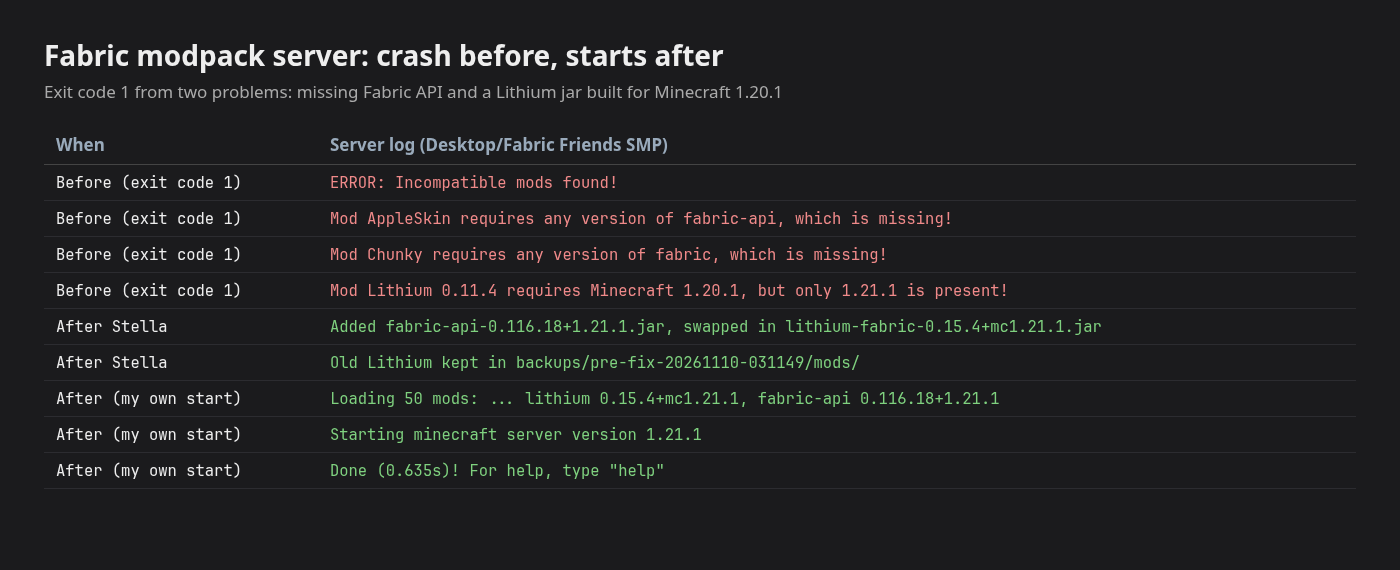
Both causes found and fixed on the first try, with no follow-up: Stella added Fabric API 0.116.18 and swapped Lithium 0.11.4 (built for 1.20.1) for 0.15.4 for 1.21.1, keeping the old jar in a backup folder. Started afterwards with the pack's own start script, the server loaded 50 mods and reached “Done”.
The pack is a small Fabric 1.21.1 server made for this run from real mods, with Fabric API left out and the wrong Lithium on purpose. Stella took 1 minute 52 seconds; the wait is sped up 10×.
How Stella does it.
- Reads
logs/latest.logand the newest crash report, then opens each mod jar to see which Minecraft version and libraries it needs - Names the cause in plain words; in the recording, Fabric API was missing and Lithium was built for Minecraft 1.20.1 instead of 1.21.1
- Downloads the matching versions from Modrinth and checks each file's SHA-512 against the one Modrinth lists
- Moves the wrong jar into a dated
backupsfolder instead of deleting it, and leaves the world and settings alone - Starts a copy of the server as a test and reads its log until it says Done, then removes the test copy
The prompt.
My modpack crashes on startup with exit code 1, can you find what's wrong and fix it? It's the server in Desktop/Fabric Friends SMP.
This is the exact prompt from the recording. If your files are somewhere else, say where.
Do it yourself.
Open the pack's own folder
In the CurseForge app, open My Modpacks, click the pack's ⋮ menu and choose Open Folder. For a server, it's the folder with start.bat or start.sh. Everything you need is in
logsandcrash-reportsinside it.Read the last real error
Open
logs/latest.log(or the newest file incrash-reports) in Notepad or TextEdit and search for ERROR, “requires” or “Caused by”. Fabric spells it out (“Mod AppleSkin requires any version of fabric-api, which is missing!”); Forge buries it near the bottom of a long stack trace.Add or swap the mod it names
Download the missing library (Fabric API, Architectury, Cloth Config…) or the right version of the named mod from CurseForge or Modrinth. Pick the file for your exact Minecraft version and loader, put it in
mods, and move the old one out rather than deleting it.Check Java and memory
Minecraft 1.20.5 and newer need Java 21; 1.18 to 1.20.4 need Java 17. In CurseForge, Settings, Minecraft, Java Settings sets memory for every pack, and a pack's Profile Options can override it. Most packs want 6 to 8 GB, never more than two-thirds of your RAM.
Launch again, one change at a time
Start the pack after each fix and read the new log; fixing one error often reveals the next. If a pack updated itself and broke, CurseForge's ⋮ menu can switch it back to the previous version.
Where it stops.
- The recording is a Fabric server on Linux, where the log named both problems. A CurseForge client on Windows works the same way in the files, but Stella hasn't been recorded doing it there, and it doesn't sign in to your Minecraft account or launch the game for you.
- Forge and NeoForge crashes (mixin conflicts, client-only mods on a server, out-of-memory) are harder to read, and may take a few rounds of launch, read, fix.
- Stella doesn't say how to start the server again unless you ask; it's the same start.bat or start.sh as before.
- If the crash is in your graphics driver (an
hs_err_pidfile, or exit code -1073741819), mods aren't the cause; update the driver first.
Questions.
What does exit code 1 mean in Minecraft?
Only that Java exited with an error. It's the same code for a missing mod, a wrong Java version or a bad setting, which is why the log matters more than the number.
Will more RAM fix exit code 1?
Only when the log says the game ran out of memory. Too much RAM can cause stutters of its own, so read the error before raising the slider.
What about MCDoctor and other crash log readers?
MCDoctor.ai reads a pasted log and explains it, with a few free analyses a month. That helps you understand the crash; you still download and swap the mods yourself. Stella does both on your computer, and it's free with the ChatGPT or Claude plan you already have.
I'm starting from a plain game. Where do I begin?
Install a loader first, then add mods made for the same Minecraft version. The guide to install Fabric, Sodium and Iris walks through it, and Stella can do it in the same chat.
Is Stella free for this?
Yes. Free with the ChatGPT or Claude plan you already have. Sign in with your ChatGPT plan, or use your Claude plan through Claude Code, and this task costs nothing extra. New accounts also get a small free trial of Stella’s own models.
Can I control what Stella changes on my computer?
Yes. Stella works on Windows, Mac and Linux with your own files and shows each step in the chat, so you can watch it and stop it at any point. Tell it what it may not do, as the prompts on these pages do (“don't delete anything without asking”). In the Downloads recording it deleted nothing until it was told to go ahead. It also refuses commands that would wipe a whole disk, your home folder or system folders.
Checked against these sources on 10 November 2026.