Organize a messy Downloads folder
Everything sorted into folders and the duplicates found, with nothing lost.
A real run on 10 November 2026, on a Linux computer, using Stella’s own models (GPT-6 Luna). The waiting is sped up; it took 4 min 04 s in real time.
The short answer.
Sort the folder by type, move documents, pictures, videos and archives into their own folders, then delete installers you've already used and the duplicate copies with “(1)” in the name. Windows can also clear old downloads automatically. Stella (stella.sh) does the sorting on your computer, finds true duplicates by their contents rather than their names, and, because the prompt says so, deletes nothing until you tell it to.
Stella does this on Windows, Mac and Linux.
What happened.
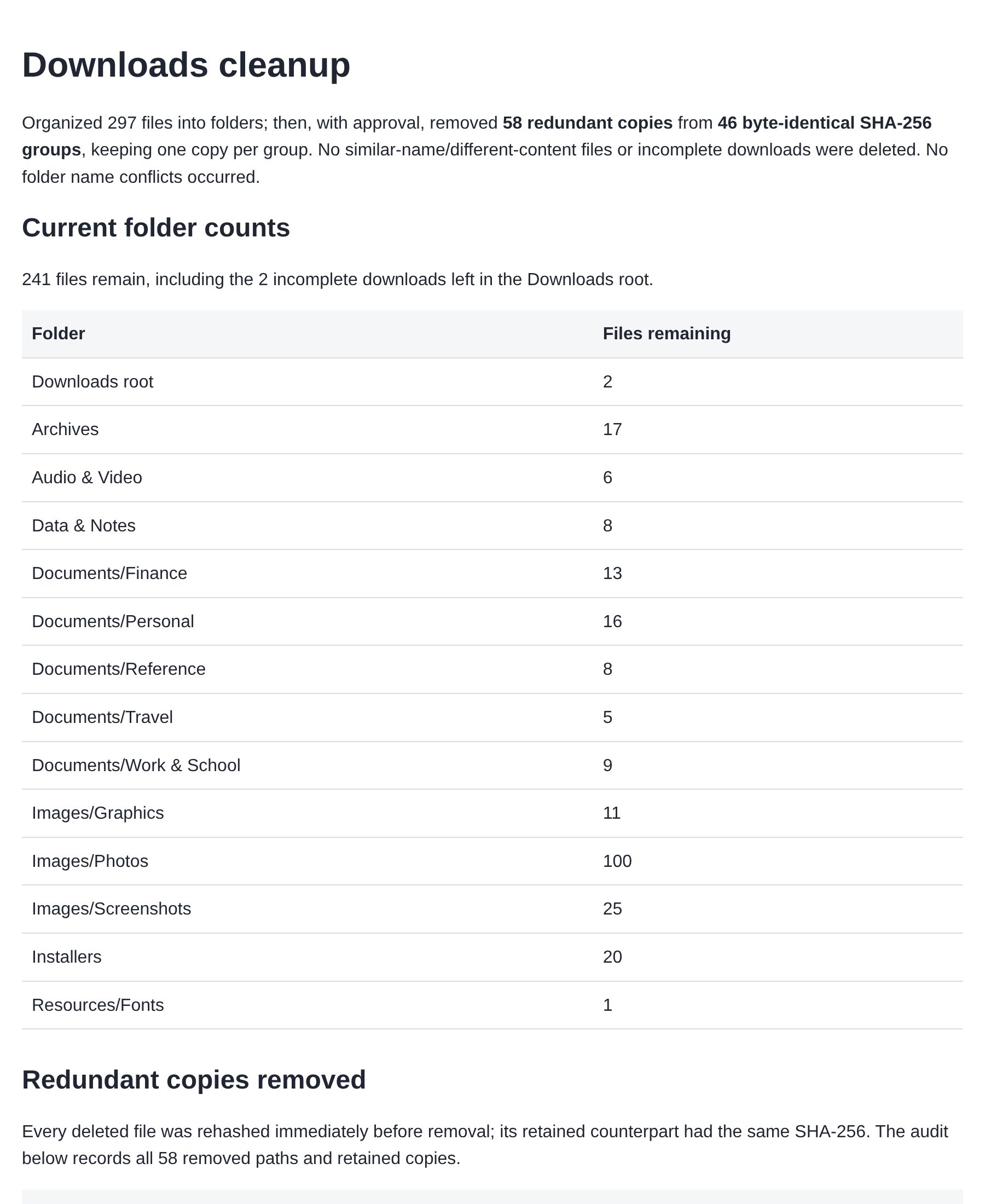
297 of 299 files sorted into 14 folders, 46 groups of identical files found and reported with nothing deleted, then, after the go-ahead typed in the chat, 58 extra copies removed with one of each kept. 241 files remain, and every move and removal is in a log.
The Downloads folder is a test folder of 299 files made for this run. The waits are sped up.
How Stella does it.
- Sorts every file into a handful of folders by name and type: Documents (split into Finance, Personal, Travel and so on), Images, Installers, Archives, Audio & Video
- Leaves anything unclear where it is; in the recording, two half-finished downloads stayed in Downloads for you to check
- Finds true duplicates by comparing contents (SHA-256), and flags files with similar names but different contents as possible revisions, not duplicates
- Writes a report and a log of every move; in the recording it deleted nothing until it was told to go ahead, as the prompt asks
- When you approve, removes only the exact extra copies, checking each one again just before, and logs every removed path next to the copy it kept
The prompt.
My Downloads folder is a mess, sort it into folders and find duplicates, but don't delete anything without asking.
This is the exact prompt from the recording. If your files are somewhere else, say where.
Do it yourself.
See what's there, biggest first
Open Downloads. On Windows, switch File Explorer to Details view and click the Size column; on a Mac, use View, then as List, and sort by Size. Big video files and disk images are usually most of the space.
Group by type
On Windows, right-click an empty spot and choose Group by, then Type. On a Mac, choose View, then Use Groups, and group by Kind. You now see all PDFs, images, installers and archives together.
Make folders and drag each group in
Create a handful of folders (Documents, Images, Video, Audio, Archives, Installers) and drag each group into its folder. Keep it to a few; ten folders become their own mess.
Delete what you've already used
Installers (.exe and .msi on Windows, .dmg and .pkg on Mac) are safe to delete once the app is installed. Zip files you've already extracted can go too. Files named like
report (1).pdfare usually repeat downloads: open both and check before deleting one.Stop it piling up again
Windows: Settings, System, Storage, Storage Sense, then set “Delete files in my Downloads folder if they haven't been opened for more than” to 30 or 60 days. Mac: there's no built-in timer for Downloads, so put a monthly reminder in your calendar.
Where it stops.
- In the recording Stella deleted nothing until it was told to, because the prompt said so. Its deletes are permanent, not to the Recycle Bin or Trash. If you want a safety net, say “move the extra copies to the Trash” in your go-ahead.
- It won't open or run installers it finds. It only reports what they are.
- If Downloads syncs with OneDrive or iCloud, moving files also moves them in the cloud copy. Say so in the prompt if you'd rather it left synced files alone.
- It sorts by names and file types, so a file called
scan_0012.pdflands in Documents, not in the exact subfolder you'd choose. Check the report and move the odd one by hand, or tell Stella your own folder names first.
Questions.
Is it safe to delete everything in Downloads?
Usually not all at once. Some people keep their only copy of a tax form or photo there. Delete installers and duplicates freely, but look at documents and pictures before they go.
How do I find duplicate files on Windows?
Windows has no built-in duplicate finder. Sorting by name shows copies like “file (1)”, but true duplicates can have different names. A tool that compares file contents, or Stella, catches those.
Will moving files out of Downloads break anything?
No. Apps don't run from files in Downloads. The only catch is a browser's download list, whose links stop working once a file moves.
What should I do with all the bank statements in Downloads?
Move them into one Statements folder first. If you need the numbers, turn the statement PDFs into one Excel sheet; then the PDFs can go to an archive folder or your cloud storage.
Can I sort Downloads automatically every week?
Yes. Ask Stella to repeat the same sort every Sunday; it runs on schedule and tells you in the chat what it moved. Storage Sense on Windows only deletes old files; it doesn't sort them.
Is Stella free for this?
Yes. Free with the ChatGPT or Claude plan you already have. Sign in with your ChatGPT plan, or use your Claude plan through Claude Code, and this task costs nothing extra. New accounts also get a small free trial of Stella’s own models.
Can I control what Stella changes on my computer?
Yes. Stella works on Windows, Mac and Linux with your own files and shows each step in the chat, so you can watch it and stop it at any point. Tell it what it may not do, as the prompts on these pages do (“don't delete anything without asking”). In the Downloads recording it deleted nothing until it was told to go ahead. It also refuses commands that would wipe a whole disk, your home folder or system folders.
Checked against these sources on 10 November 2026.