Find duplicate photos, including resized copies
Every copy found, the originals kept, and nothing deleted until you say so.
A real run on 12 November 2026, on a Linux computer, using Claude Code with Opus, on a Claude plan. The waiting is sped up; it took 1 min 43 s in real time.
The short answer.
Exact copies are easy to find by comparing file contents, but resized or re-saved copies (the ones WhatsApp and old phone backups make) need a tool that compares the pictures themselves, such as the free dupeGuru in Picture mode. Review every group before deleting. Stella (stella.sh) finds both kinds on your computer, shows each group side by side with the copy it would keep, and deletes nothing until you reply.
Stella does this on Windows, Mac and Linux.
What happened.
All 14 copies among 38 photos found, against an answer key written before the run: 6 exact copies, 5 resized ones down to 800 pixels wide, a lower-quality re-save, a half-size PNG and a copy with its camera data stripped. None of the 12 look-alike pairs (two shots of the same scene) was flagged. Nothing changed until the reply; then the 14 copies went to the Trash and all 24 originals were byte-for-byte unchanged.
The photos are generated images made for this run, with copies spread over Old phone backup and WhatsApp Images folders. The first wait is sped up 12×, scrolling the review 2× and the clean-up 6×.
How Stella does it.
- Scans the folder you name, subfolders included, and tells you up front that nothing will be deleted
- Finds exact copies by their file contents, then resized, re-saved and converted copies by comparing the pictures themselves
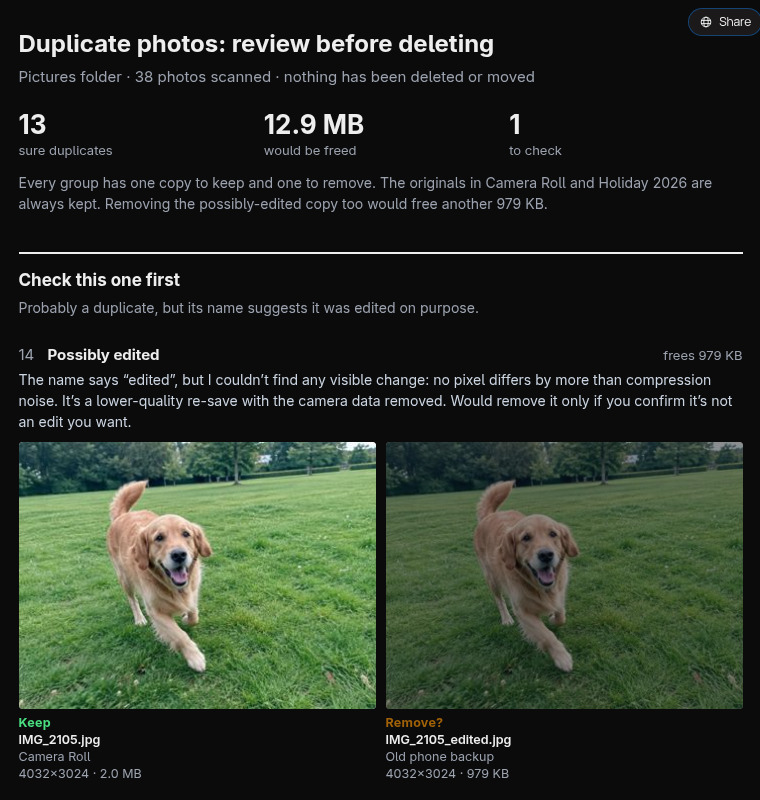
- Looks at the borderline pairs: in the recording it checked two similar sunset shots and kept both as different photos, and flagged a file named “edited” for you to decide
- Makes a review page with each group side by side, the copy it would keep (always the full-size original) and the space you'd get back
- Waits for your answer, then moves the copies to the Trash, where Restore puts them back
The prompt.
Find duplicate photos in my Pictures folder, including resized copies, and show me before deleting anything.
This is the exact prompt from the recording. If your files are somewhere else, say where.
Do it yourself.
Back up first
Copy the folder to an external drive or cloud storage before deleting anything. Duplicate finders are good, not perfect, and a photo deleted outside the Recycle Bin or Trash is hard to get back.
Exact copies: any duplicate finder
Free tools like dupeGuru (Standard mode) or Czkawka compare file contents, so they only match byte-identical files: the
IMG_1234 (1).jpgkind. They're fast and safe, but miss every resized or re-saved copy.Resized copies: dupeGuru Picture mode
Switch dupeGuru to Picture mode, add your Pictures folder, and scan. It compares the images themselves, so a 1600-pixel WhatsApp copy matches its 12-megapixel original. Start with the default filter hardness; raise it if different shots get grouped together.
Review every group, then delete to the Trash
Sort each group by size and keep the biggest, which is usually the original. Look at any pair with different names or dates before you mark it. In dupeGuru, use Send Marked to Trash (it goes to the Recycle Bin on Windows) rather than a permanent delete, so a mistake can be undone.
Photos in Apple Photos? Use its Duplicates album
On a Mac or iPhone, open Photos, then the Duplicates album under Utilities, and use Merge. It combines each group into the best-quality version and keeps the details. It only covers photos inside the Photos library, not loose folders.
Where it stops.
- Stella asked first here because the prompt said “show me before deleting anything”. Keep that sentence in your prompt; the recording doesn't show what it does without it.
- The review page was saved in your Pictures folder. Stella moved it to the Trash with the copies afterwards without mentioning it.
- It compares photos, not videos. Duplicate videos need a separate ask, and comparing them takes longer.
- Comparing pictures took a Python image library that Stella installed in its own folder first; on this Linux computer Python was already there. A Windows run hasn't been recorded yet.
- To check borderline pairs, Stella looks at small previews, so a few thumbnails go to the AI model you use in Stella. The full photos stay on your computer.
Questions.
Will it delete a different photo that just looks similar?
Not in the recording. Twelve pairs of near-identical shots (two boat photos, two sunsets) were planted as traps; none was flagged, and the closest pair was listed separately as “similar, not duplicates”.
Which copy does it keep?
The full-size original: the largest version with the camera data, in your camera or holiday folder. Copies from WhatsApp, backups or edits are the ones it proposes to remove, and you can swap any group before replying.
Can I get deleted duplicates back?
Yes, when they go to the Trash or Recycle Bin, which is what Stella did here: Restore puts each one back in its original folder. Emptying the Trash makes it permanent.
Are duplicate photo cleaner apps safe?
The open-source ones (dupeGuru, Czkawka) are. Be wary of “PC cleaner” apps that scan for free and then charge to delete. Whatever you use, review the groups and send deletions to the Trash.
Is Stella free for this?
Yes. Free with the ChatGPT or Claude plan you already have. Sign in with your ChatGPT plan, or use your Claude plan through Claude Code, and this task costs nothing extra. New accounts also get a small free trial of Stella’s own models.
Can I control what Stella changes on my computer?
Yes. Stella works on Windows, Mac and Linux with your own files and shows each step in the chat, so you can watch it and stop it at any point. Tell it what it may not do, as the prompts on these pages do (“don't delete anything without asking”). In the Downloads recording it deleted nothing until it was told to go ahead. It also refuses commands that would wipe a whole disk, your home folder or system folders.
Checked against these sources on 12 November 2026.