Convert bank statement PDFs to Excel
One clean Excel sheet from all your statements, with the totals checked.
A real run on 10 November 2026, on a Linux computer, using Stella’s own models (GPT-6 Luna). The waiting is sped up; it took 2 min 04 s in real time.
The short answer.
First check whether your bank lets you download transactions as CSV or Excel; it's the cleanest route. If you only have PDFs, Excel for Microsoft 365 on Windows can import the tables from a PDF, and you tidy the columns by hand. Stella (stella.sh) reads every statement you give it, puts all the transactions into one spreadsheet in date order, and checks each month against the totals printed on the statement.
Stella does this on Windows, Mac and Linux.
What happened.
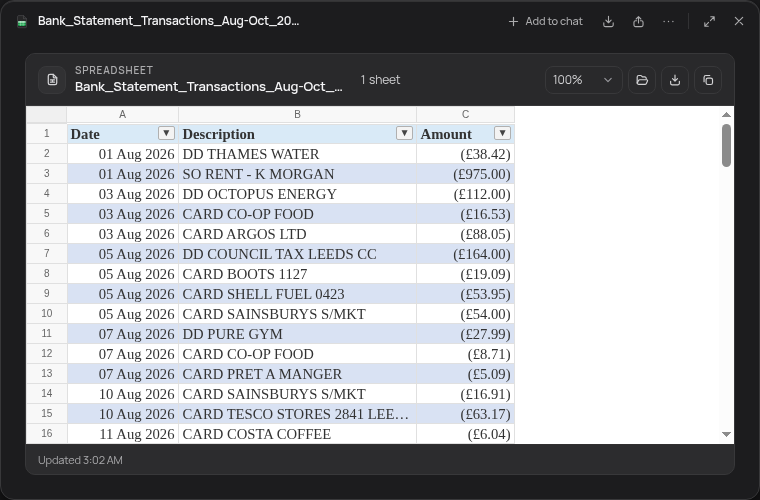
116 transactions from three monthly statements (August to October 2026) in one sheet. Checked afterwards against an answer key: every row matches, dates are real Excel dates, amounts are numbers, and each month's money in and out equals the statement's summary (August: £2,685.58 in, £2,106.68 out).
The statements are sample PDFs from a fictitious bank, made for this run, with selectable text (not scans). The wait is sped up 15×.
How Stella does it.
- Reads each statement PDF you point it to, one month or a whole year
- Pulls every transaction into one sheet in date order; in the recording, Date, Description and Amount, with money out as negative numbers (ask for separate in and out or balance columns if you prefer)
- Stores dates as real dates and amounts as numbers in your currency, so sorting, filters and SUM work straight away
- Checks its work: each month's money in and out, and the running balance, against the summary printed on that statement
- Saves an .xlsx file that opens in Excel, Numbers or Google Sheets; in the recording it went to Stella's outputs folder, so say where if you want it next to the PDFs
The prompt.
Turn these bank statement PDFs into one Excel sheet with date, description and amount.
This is the exact prompt from the recording. If your files are somewhere else, say where.
Do it yourself.
Look for a CSV download first
Sign in to online banking on your computer and look for Export, Download transactions or similar next to your account history. Most banks offer CSV or Excel for at least the last 12 to 24 months, which skips the PDF problem entirely.
Import a PDF with Excel (Windows, Microsoft 365)
In Excel, choose Data, Get Data, From File, From PDF, and pick the statement. The Navigator lists every table it found; pick the transaction tables (often one per page) and click Transform Data to open Power Query.
Clean up in Power Query
Remove the header and footer rows that repeat on every page, set the date column's type to Date and the amount columns to Decimal Number, then Close and Load. Use Append Queries if each page came in as its own table.
Check the totals yourself
Add a SUM of money in and money out, and check that opening balance plus money in minus money out equals the closing balance printed on the statement. If it's off, a row was split across two lines or a page was skipped.
Scanned statement? Run OCR first
If you can't select the text in the PDF, it's a picture. Run it through OCR (Adobe Acrobat's Scan & OCR, or the free OCRmyPDF) before importing, then check the numbers carefully: OCR misreads 1s, 7s and decimal points.
Where it stops.
- Stella works from the statements you give it. It doesn't need, and won't ask for, your online banking password.
- The statement text goes to the AI model you use in Stella (your ChatGPT or Claude plan, or a local model if you'd rather it stayed on your computer). Choose accordingly for sensitive files.
- Scanned or photographed statements are harder to read accurately. Stella flags the months that don't add up, but check those by eye.
- It isn't tax or accounting advice. It gets the numbers into a sheet; categorising them for a tax return is still your call or your accountant's.
Questions.
Is there a free way to convert bank statement PDFs to Excel?
Yes. Your bank's own CSV download is free, Excel's PDF import is included in Microsoft 365, and Stella is free with the ChatGPT or Claude plan you already have. Online converters work too, but you're uploading your statement to a stranger's server.
Why do my amounts come out as text in Excel?
Currency symbols, spaces or a trailing “CR” or “DR” stop Excel reading them as numbers. Remove those with Find and Replace, or set the column type to Decimal Number in Power Query.
Can I combine a whole year of statements into one sheet?
Yes. In Excel, put the PDFs in one folder and use Get Data, From Folder, then combine. Stella does the same when you point it at the folder, and checks each month's balance. If they're scattered through Downloads, sort the Downloads folder first.
Does Excel for Mac import PDFs?
Not as of November 2026: PDF import is in Excel for Microsoft 365 on Windows. On a Mac, use your bank's CSV, copy tables out of Preview, or have Stella build the sheet.
Is Stella free for this?
Yes. Free with the ChatGPT or Claude plan you already have. Sign in with your ChatGPT plan, or use your Claude plan through Claude Code, and this task costs nothing extra. New accounts also get a small free trial of Stella’s own models.
Can I control what Stella changes on my computer?
Yes. Stella works on Windows, Mac and Linux with your own files and shows each step in the chat, so you can watch it and stop it at any point. Tell it what it may not do, as the prompts on these pages do (“don't delete anything without asking”). In the Downloads recording it deleted nothing until it was told to go ahead. It also refuses commands that would wipe a whole disk, your home folder or system folders.
Checked against these sources on 10 November 2026.