Combine multiple Excel files into one sheet
One sheet with every row, the columns lined up, and one header row.
A real run on 12 November 2026, on a Linux computer, using Claude Code with Opus, on a Claude plan. The waiting is sped up; it took 1 min 32 s in real time.
The short answer.
In Excel for Windows or Mac, put the files in one folder and use Data, Get Data, From File, From Folder, then Combine; Power Query stacks them and matches columns by name. Copying and pasting works for two or three files but misaligns columns that are in a different order. Stella (stella.sh) merges a whole folder of Excel and CSV files into one new sheet, matches columns by name and checks the totals.
Stella does this on Windows, Mac and Linux.
What happened.
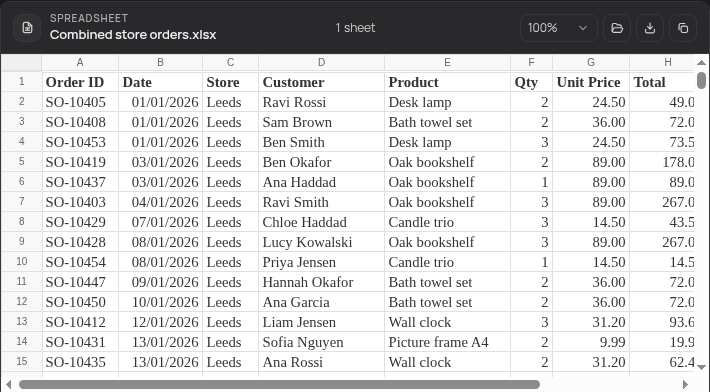
Ten files (eight .xlsx, two .csv) combined into one sheet of 277 orders in about 90 seconds. Checked afterwards against an answer key: exactly one header row, no blank or repeated header rows, and every field of every row matches its source, including the file with its columns in a different order, the one with a title row above the header, and the CSVs' UK dates. The ten originals were unchanged.
The order files are fictitious, made for this run. The wait is sped up 10×; the end shows the combined sheet in Stella's own spreadsheet viewer.
How Stella does it.
- Opens every workbook and CSV in the folder and works out where each one's header row is, even below a title line
- Matches columns by their names, so a file with its columns in a different order still lands in the right place
- Reads dates and amounts as real dates and numbers, including day-first dates like 02/05/2026 in a CSV
- Writes one new .xlsx next to the originals, with a Source File column so you can filter by where each row came from
- Checks its own work (row counts, duplicate IDs, missing values, quantity × price = total) and tells you what it found
The prompt.
Combine all these Excel files into one sheet. They're in Documents/Store orders.
This is the exact prompt from the recording. If your files are somewhere else, say where.
Do it yourself.
Put the files in one folder
Move every file you want combined into one folder, and nothing else. Power Query takes everything it finds there, so a stray summary workbook or an old copy ends up in your data.
Use Get Data, From Folder
In Excel, choose Data, Get Data, From File, From Folder, pick the folder, then Combine, Combine & Transform Data. Choose the sheet to use from the first file; Power Query applies the same steps to every file and stacks them, matching columns by their header names.
Fix title rows and mixed files
If a file has a title line above the headers, it shows up as junk rows: in Power Query, edit the Transform Sample File query to Remove Top Rows and Use First Row as Headers, which then applies to every file. Sheets with different names, or CSVs mixed with workbooks, need one query per kind, then Append Queries.
Check dates and totals
Set the date column's type with Using Locale (for example English, United Kingdom) so 02/05 isn't read as 5 February. Then Close & Load, and compare the row count and a SUM of the totals with the source files before you trust it.
Only two or three files? Copy and paste
Open each file, check its columns are in the same order as the first, and paste the rows under each other without the header row. Use Paste Special, Values if the source has formulas.
Where it stops.
- It saved a new sheet rather than a Power Query connection, so it won't refresh when you add files next month. Ask Stella again with the new files, or build the From Folder query above if you need a live link.
- It didn't tell the user about the file with its columns in a different order or the one with a title row; it handled both correctly but silently. Ask for a summary of what it fixed if you want to see that.
- The recording ran on Linux without Excel, using Stella's own spreadsheet tool. The result is an ordinary .xlsx that opens in Excel, Numbers or Google Sheets.
- The rows go to the AI model you use in Stella while it reads and checks them. For confidential sheets, choose your model accordingly.
Questions.
Can Excel combine files with different column orders?
Yes, Power Query's From Folder matches columns by header name, not position. It breaks when the names differ (Qty vs Quantity); rename them in the files or in the query first. Stella matches them by name too and tells you if a name doesn't fit.
How do I combine CSV files into one?
The same From Folder route works for CSVs. For a quick join of identical CSVs, copy *.csv all.csv in Windows Command Prompt works, but it repeats the header row once per file, so delete those afterwards.
Will merging change my original files?
Not with Power Query, and not in the recording: Stella wrote a new file next to them, and all ten originals were byte-for-byte unchanged afterwards.
Can it also make a summary or chart?
Yes, in the same chat, for example totals by store and month on a second sheet. The same approach turns bank statement PDFs into one Excel sheet.
Is Stella free for this?
Yes. Free with the ChatGPT or Claude plan you already have. Sign in with your ChatGPT plan, or use your Claude plan through Claude Code, and this task costs nothing extra. New accounts also get a small free trial of Stella’s own models.
Can I control what Stella changes on my computer?
Yes. Stella works on Windows, Mac and Linux with your own files and shows each step in the chat, so you can watch it and stop it at any point. Tell it what it may not do, as the prompts on these pages do (“don't delete anything without asking”). In the Downloads recording it deleted nothing until it was told to go ahead. It also refuses commands that would wipe a whole disk, your home folder or system folders.
- Microsoft: Import data from a folder with multiple files (Power Query)
- Microsoft: Append queries (Power Query)
Checked against these sources on 12 November 2026.