Reduce PDF file size when it's too large to email
A 38 MB scan down to 5 MB, still sharp, without uploading it anywhere.
A real run on 10 November 2026, on a Linux computer, using Stella’s own models (GPT-6 Luna). The waiting is sped up; it took 1 min 20 s in real time.
The short answer.
Most oversized PDFs are scans, where every page is a large photo. Shrink the images and the file drops to a fraction of its size: on a Mac, Preview's Export with the Reduce File Size filter; on Windows, the free Ghostscript with its /ebook setting. Online compressors work too, but they upload your file. Stella (stella.sh) makes a smaller copy on your computer, checks the pages are still readable and leaves the original alone.
Stella does this on Windows, Mac and Linux.
What happened.
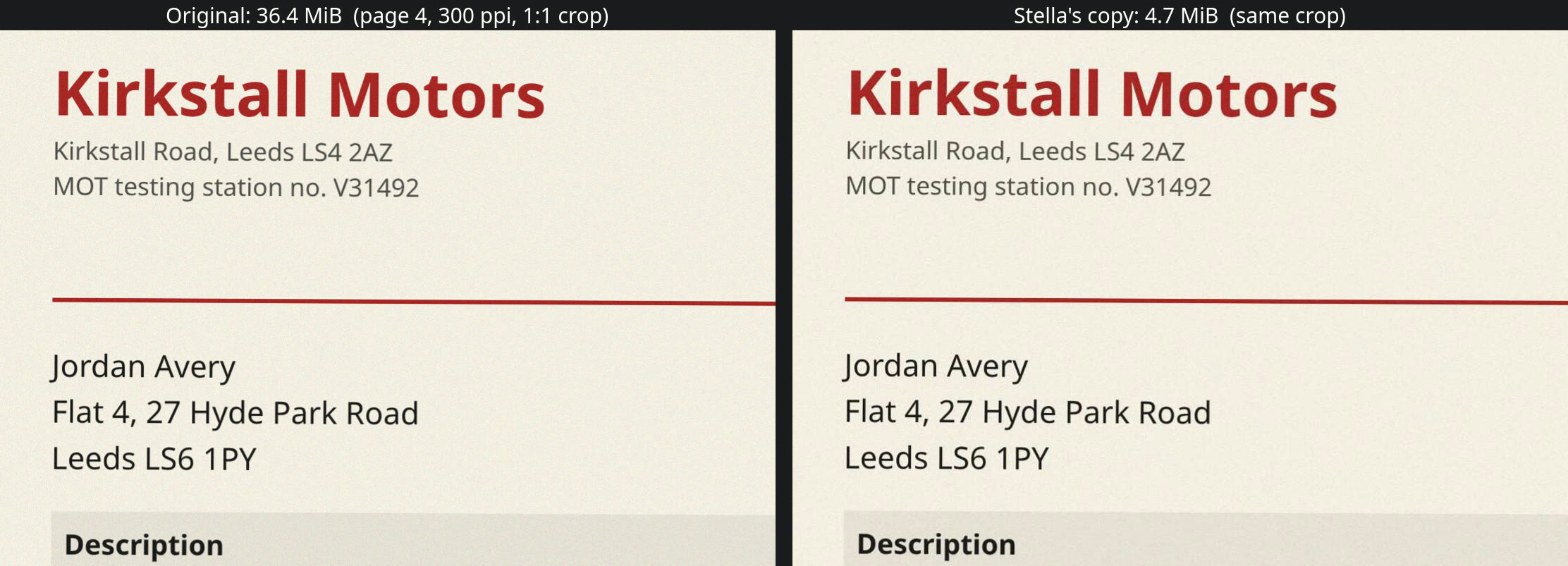
38.2 MB down to 4.96 MB (13% of the original) on the first try, in about 70 seconds. The original was untouched (same checksum). Checked afterwards: the small print looks the same in a 1:1 crop, OCR reads the same 85 words from a page of both files, and the pages are still full resolution, just compressed harder.
The PDF is 14 scanned-looking pages of fictitious invoices, bills and letters, made for this run. The waits are sped up 6× and 4×; the end shows the copy opened in Stella's own PDF viewer.
How Stella does it.
- Finds the file (in the recording, “the tax documents one in my Downloads”) and looks at why it's big: here, 14 full-colour page scans at 300 ppi and no text layer
- Tries a couple of Ghostscript settings on a copy, never on the original
- Renders pages from the original and the copy and looks at them side by side to check the small print is still readable
- Saves the smaller copy next to the original with “- compressed” in the name, checks it with
qpdf --check, and removes its own temporary files - Tells you the before and after sizes, and anything worth knowing about the file, such as that it has no searchable text
The prompt.
This PDF is too big to email (it says the limit is 25 MB). Make it small enough without making it unreadable. It's the tax documents one in my Downloads.
This is the exact prompt from the recording. If your files are somewhere else, say where.
Do it yourself.
Know the limit you're aiming for
Gmail allows 25 MB per email and turns bigger attachments into a Google Drive link; Outlook's own guidance says 20 MB; job and visa portals often stop at 2 to 10 MB. Attachments grow by about a third in transit, so aim well under the limit.
On a Mac: Preview's Export
Open the PDF in Preview, choose File, Export, and pick Reduce File Size in the Quartz Filter menu (newer versions also offer “Optimize images for screen”). Save under a new name and check the pages: it can blur small print, and a text-only PDF may not shrink at all.
On Windows (or anywhere): Ghostscript
Install the free Ghostscript, open Command Prompt in the PDF's folder and run
gswin64c -sDEVICE=pdfwrite -dPDFSETTINGS=/ebook -dNOPAUSE -dQUIET -dBATCH -sOutputFile=small.pdf big.pdf(gson Mac and Linux). /ebook keeps images at about 150 dpi; /screen is smaller and blurrier, /printer larger and sharper.Scan smaller next time
Most scanner apps default to colour at 300 or 600 dpi. For paperwork, 200 to 300 dpi in greyscale is plenty and makes files several times smaller from the start.
Still too big? Split it or send a link
Split the file into two emails (in Preview, drag pages out into a new document; or
qpdf --split-pages), or upload it to OneDrive or Google Drive and send a link. Online compressors like iLovePDF and Smallpdf work, but you're uploading tax papers or IDs to their servers.
Where it stops.
- It compressed much harder than it needed to: 4.96 MB for a 25 MB limit. It's clearly readable, but say “keep as much quality as fits under 20 MB” if you'd rather have sharper pages.
- It didn't offer to make the scan searchable. Ask for OCR in the same chat if you want to search or copy the text later.
- Ghostscript was already installed on the test computer. On Windows, expect Stella to install it or another tool first, which hasn't been recorded yet.
- To check readability, Stella looks at rendered pages, so page images go to the AI model you use in Stella. Choose your model accordingly for very sensitive documents.
Questions.
Why is my PDF so big?
Usually because each page is a high-resolution colour photo: a scan, a phone capture, or a design export full of images. Text-only PDFs are small already, which is why compressing them barely helps.
Will compressing a PDF make it blurry?
It can. Strong settings (Ghostscript's /screen, or Preview's filter on some versions) visibly soften small print. Always open the smaller copy and zoom in on the finest text before you send it.
Is it safe to use an online PDF compressor?
The big ones are reputable, but the file still leaves your computer. For tax returns, payslips, bank statements and passports, compressing locally avoids the question entirely.
Can Stella also rename or combine my PDFs?
Yes, in the same chat. It can rename PDFs by what's in them, merge several into one, or pull the numbers out of bank statements into Excel.
Is Stella free for this?
Yes. Free with the ChatGPT or Claude plan you already have. Sign in with your ChatGPT plan, or use your Claude plan through Claude Code, and this task costs nothing extra. New accounts also get a small free trial of Stella’s own models.
Can I control what Stella changes on my computer?
Yes. Stella works on Windows, Mac and Linux with your own files and shows each step in the chat, so you can watch it and stop it at any point. Tell it what it may not do, as the prompts on these pages do (“don't delete anything without asking”). In the Downloads recording it deleted nothing until it was told to go ahead. It also refuses commands that would wipe a whole disk, your home folder or system folders.
- Apple: Reduce the size of a PDF in Preview
- Ghostscript: Optimizing PDFs
- Microsoft: Reduce attachment size to send large files with Outlook
Checked against these sources on 10 November 2026.