Add a watermark to a PDF before you send it
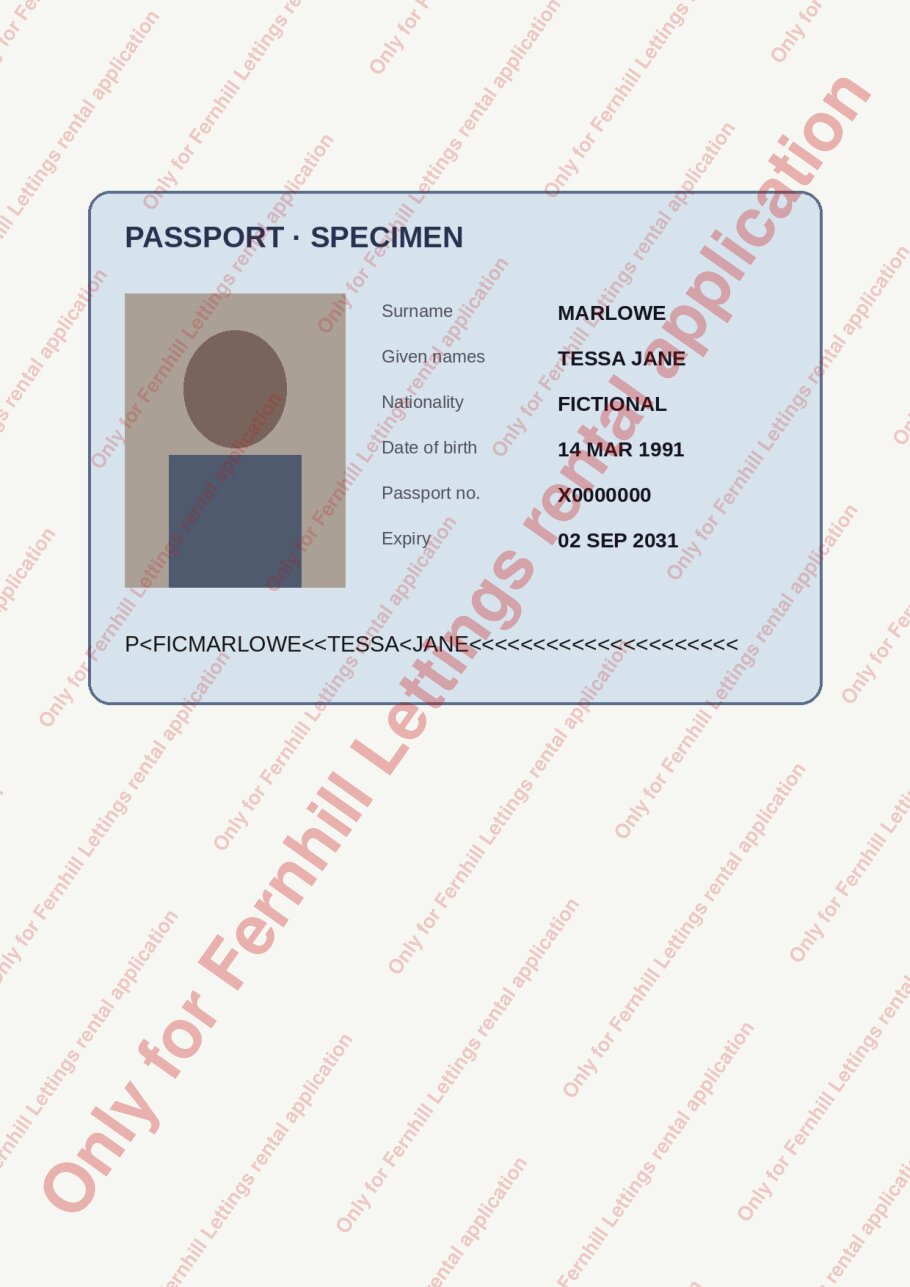
A passport scan, a payslip and a bank statement, each marked for one letting agent.
A real run on 14 November 2026, on a Linux computer, using Claude Code with Opus, on a Claude plan. Shown 4× faster; it took 1 min 36 s.
The short answer.
On Windows the free PDF24 Creator adds a text watermark to every page and saves a copy; on a Mac, Preview can only add a text box page by page. For a scanned passport or ID, put the mark in front of the page, not behind it: a watermark behind a scan is hidden by the picture. Stella (stella.sh) watermarked all three documents for a rental application on your own computer, kept the originals, and left the payslip and statement text selectable.
Stella does this on Windows, Mac and Linux.
What happened.
Three watermarked copies in about a minute and a half. Checked afterwards against an answer key written before the run: one copy of each document, the wording on all five pages, the mark visible on top of the image-only passport scan, the payslip and statement text still selectable, and the originals unchanged.
The passport is a drawn specimen for a fictitious person, and the payslip and statement were made up for this run. The work is sped up 4×.
How Stella does it.
- Finds the passport scan, the October payslip and the three-page bank statement in Downloads
- Draws “Only for Fernhill Lettings rental application” on top of every page in large, see-through red letters running corner to corner
- Repeats the wording in smaller rows across the whole page, so there's no clean corner to crop out and reuse
- Puts the mark over the passport picture, where a watermark behind the page would have been hidden
- Saves the copies, named “… - Fernhill Lettings copy”, in a new folder in Downloads; the originals stay as they were
- Says plainly that someone with PDF editing software could still remove the mark, and offers flattened picture-only copies as a harder-to-strip option
The prompt.
I have to send copies of my passport, payslip and bank statement to a letting agent. Put a watermark across every page saying "Only for Fernhill Lettings rental application" so they can't be reused, and keep my originals as they are.
This is the exact prompt from the recording. If your files are somewhere else, say where.
Do it yourself.
On Windows: PDF24 Creator
Install the free PDF24 Creator, which works offline, and open its watermark tool. Add the PDFs, type the wording, pick a large size, a light colour and a diagonal angle, and save the copies under new names so the originals stay clean.
On a Mac: Preview, page by page
Preview has no watermark tool. Open the PDF, choose Tools › Annotate › Text, type the wording, make it large and pale, and drag it across the page. Repeat on every page, then File › Export as PDF under a new name.
Scans and photos of ID: put the mark in front
A passport or licence scan is one picture filling the page. Tools that place the watermark behind the content hide it completely there. If the tool asks (Acrobat's watermark dialog calls it location), choose on top of the page, then open the copy and look.
Command line, many files
Make a one-page PDF with just the wording, then use the free pdftk:
pdftk statement.pdf stamp mark.pdf output statement-marked.pdfputs it on top of every page.backgroundinstead ofstampputs it behind, which a scan would hide.Check before you send
Open each copy, look at every page, and try selecting text in the payslip. Send the copies, not the originals, and keep the agency's name in the wording so a reused copy shows where it came from.
Where it stops.
- A watermark discourages reuse; it doesn't prevent it. Anyone with PDF editing software can try to cover or remove it, which Stella said in its reply.
- Stella kept the text selectable. If you'd rather have flattened picture-only pages, which are harder to strip, ask for them; the text then can't be selected or searched.
- Stella reads the documents to find and mark them, so their names and text go to the AI model you use. The watermarking runs on your computer and nothing goes to a PDF website.
- Recorded on Linux, where Stella used a PDF library already set up there. On a Mac or Windows PC it may install a similar free PDF tool first; the copies come out the same.
Questions.
What should a watermark on ID documents say?
Who it's for and why, for example “Only for Fernhill Lettings rental application”, sometimes with the date. A specific mark is much less useful to anyone who gets hold of the copy.
Is it safe to use an online watermark site for a passport?
Those sites upload the very documents you're protecting. A desktop tool or Stella does the watermarking on your own computer.
Can I hide parts of the document too, like account numbers?
Yes, but that's redaction, not a watermark. See redact a PDF, which removes the text underneath instead of just covering it.
Can I watermark photos instead of PDFs?
Yes: see add a watermark to photos for a name in the corner of a whole folder of pictures.
The copies are too big to email. What now?
Is Stella free for this?
Yes. Free with the ChatGPT or Claude plan you already have. Sign in with your ChatGPT plan, or use your Claude plan through Claude Code, and this task costs nothing extra. New accounts also get a small free trial of Stella’s own models.
Can I control what Stella changes on my computer?
Yes. Stella works on Windows, Mac and Linux with your own files and shows each step in the chat, so you can watch it and stop it at any point. Tell it what it may not do, as the prompts on these pages do (“don't delete anything without asking”). In the Downloads recording it deleted nothing until it was told to go ahead. It also refuses commands that would wipe a whole disk, your home folder or system folders.
- PDF24 Creator (free, offline, Windows)
- Apple: Annotate a PDF in Preview
- pdftk manual: stamp and background
Checked against these sources on 14 November 2026.