Compress a video for Discord
A 231 MB clip down to 9.2 MB, still sharp, and it plays right in the chat.
A real run on 12 November 2026, on a Linux computer, using Claude Code with Opus, on a Claude plan. The waiting is sped up; it took 45 s in real time.
The short answer.
Discord's free upload limit is 20 MB (it was 10 MB until August 2026). To fit, pick a video bitrate from the length (about 8,000 kilobits per minute for 10 MB), drop to 720p, and encode with H.264 so it previews inline; HandBrake does it in a window, ffmpeg from the command line. Stella (stella.sh) does it on your computer, aims just under the size you name and checks a frame.
Stella does this on Windows, Mac and Linux.
What happened.
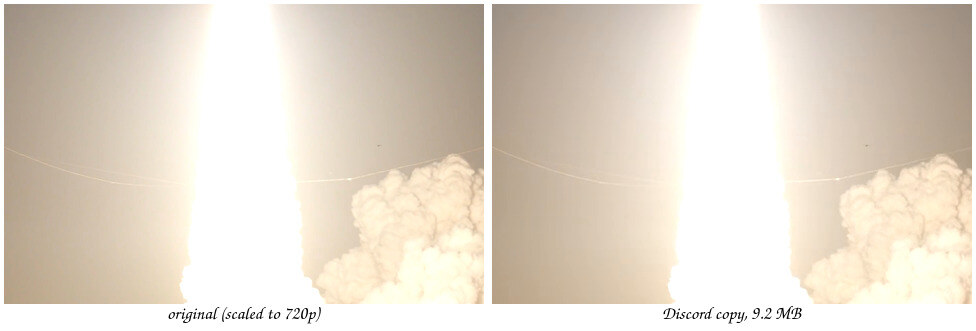
A 78-second 1080p clip, 231.3 MB, became a 9.2 MB (9,223,425 bytes) 720p MP4 in 45 seconds, the full length kept. Checked afterwards: it decodes start to end with no errors, H.264 and AAC, SSIM 0.994 against the original at the same size, and frames side by side look the same. The original was byte-for-byte unchanged.
The clip is NASA's public-domain footage of the Artemis I launch, cut to 78 seconds at 1080p and about 24 Mbit/s for this run; its audio track is silent, which Stella noticed. Waits are sped up 6× and 4×, and the dark first part of playback 4×.
How Stella does it.
- Finds the video you mean (in the recording, “the rocket launch one in my Videos folder”) and reads its length, resolution and sound
- Works out the bitrate that fits the size you asked for, here a two-pass encode aimed at about 9.5 MB
- Drops to 720p rather than starving 1080p of bits, and uses H.264 and AAC so Discord plays it right in the chat
- Grabs a frame from the middle and looks at it to check the picture still holds up
- Saves the copy next to the original with “(Discord)” in the name and leaves the original untouched
The prompt.
Make this video small enough to send on Discord (under 10 MB). It's the rocket launch one in my Videos folder.
This is the exact prompt from the recording. If your files are somewhere else, say where.
Do it yourself.
Work out the bitrate
Size in megabits is the limit × 8: 10 MB is 80 megabits, 20 MB is 160. Divide by the length in seconds and leave 10% spare for the container and sound: for a 78-second clip under 10 MB that's about 900 kbit/s of video with 64 kbit/s audio. Longer clips get less; past two or three minutes, trim it or send a link.
In HandBrake (free, Windows and Mac)
Open the video, choose the Fast 720p30 preset, and on the Video tab pick H.264, Avg Bitrate with your number, and tick 2-Pass Encoding. Set the audio to AAC at 64 or 96 kbit/s. Start, check the file size, and lower the bitrate a little if it comes out over.
With ffmpeg
Run
ffmpeg -i in.mp4 -vf scale=-2:720 -c:v libx264 -b:v 900k -pass 1 -an -f null NUL(use/dev/nullon Mac), thenffmpeg -i in.mp4 -vf scale=-2:720 -c:v libx264 -b:v 900k -pass 2 -c:a aac -b:a 64k -movflags +faststart out.mp4. Two passes land much closer to the target size than one.Keep it previewable
Use H.264 video and AAC audio in an MP4. Discord shows those inline on every device; HEVC, AV1 or MKV files may just appear as a download. Avoid odd frame rates and keep 8-bit colour (yuv420p).
Still too big? Trim, crop or link
Cut the clip to the part that matters, drop to 480p for fast-moving game footage, or upload it to YouTube (unlisted), Google Drive or Streamable and paste the link. Nitro raises the limit to 500 MB, Nitro Basic to 50 MB.
Where it stops.
- This was slow-moving launch footage. Fast game clips with lots of motion look worse at the same size; expect Stella to drop to 480p or suggest trimming, which hasn't been recorded yet.
- It aimed for 10 MB because the prompt said so. Discord's free limit has been 20 MB since August 2026, so say “under 20 MB” if that's your limit and you'd like a sharper file.
- ffmpeg was already installed on the Linux computer in the recording. On a Windows PC, Stella has to install it first, which hasn't been recorded yet.
- Stella looks at one frame to check the quality, so that frame goes to the AI model you use in Stella. The video itself stays on your computer.
Questions.
What is Discord's file size limit?
20 MB per file on a free account since August 2026 (it was 10 MB from 2024), 50 MB with Nitro Basic and 500 MB with Nitro. Check what the upload box says on your account; Discord has been testing different limits.
Can I compress a video without losing quality?
Not to a tenth of its size, but you can lose quality you won't notice. Lower the resolution to 720p first and use two-pass H.264. In the recording the copy measured SSIM 0.994 against the original, and frames side by side look the same.
Are online video compressors safe?
The well-known ones are, but your video is uploaded to their servers, and free tiers often limit length or add a watermark. Doing it on your computer avoids all three.
Can Stella also cut or caption the clip?
Yes, in the same chat: trim it to the best part, cut out silent pauses or burn in subtitles before it's compressed.
Is Stella free for this?
Yes. Free with the ChatGPT or Claude plan you already have. Sign in with your ChatGPT plan, or use your Claude plan through Claude Code, and this task costs nothing extra. New accounts also get a small free trial of Stella’s own models.
Can I control what Stella changes on my computer?
Yes. Stella works on Windows, Mac and Linux with your own files and shows each step in the chat, so you can watch it and stop it at any point. Tell it what it may not do, as the prompts on these pages do (“don't delete anything without asking”). In the Downloads recording it deleted nothing until it was told to go ahead. It also refuses commands that would wipe a whole disk, your home folder or system folders.
- HandBrake
- FFmpeg documentation
- Dexerto: Discord raises free upload limit to 20MB (August 2026)
- NASA: Artemis I Launch from NASA Causeway (source footage)
Checked against these sources on 12 November 2026.