Cut silences out of a video automatically
The pauses cut out, the original kept, the edit ready to post.
A real run on 10 November 2026, on a Linux computer, using Stella’s own models (GPT-6 Luna). The waiting is sped up; it took 1 min 31 s in real time.
The short answer.
To cut silences automatically, a tool finds the stretches where the sound stays below a loudness level for longer than a moment, then removes them with a little padding so speech doesn't sound clipped. The free, open-source auto-editor does this in one command, and ffmpeg can list every pause. Stella (stella.sh) does it on your own file: it cuts the dead air, tells you how much shorter the video is, and saves the edit next to the original.
Stella does this on Windows, Mac and Linux.
What happened.
A 92-second lecture recording cut to 46 seconds. Checked afterwards with ffmpeg's silence detector (quieter than −35 dB for half a second or more): 12 pauses in the original, none in the edit. The original file was unchanged.
The lecture is a test clip made for this run: a slide and a synthetic voice with 38 seconds of pauses added. A separate transcript of the edit matched all 135 words, nothing clipped. The wait while Stella worked is sped up 10×.
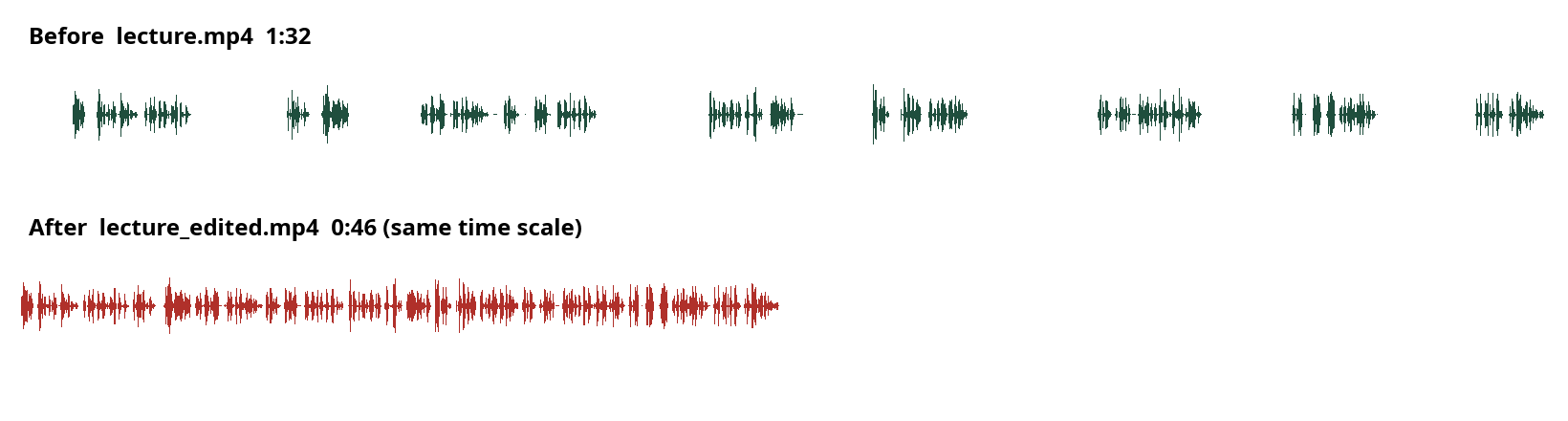
How Stella does it.
- Measures the pauses with ffmpeg's silence detector; in the recording it tried −38 dB, settled on −34 dB, and counted anything quieter for 0.35 s or more
- Keeps a short pad either side of speech (120 ms here) so words aren't clipped, then cuts the pauses and joins what's left
- Saves the edit as a new file next to the original (here
lecture_edited.mp4), which it leaves untouched - Checks its own work: runs the detector again on the edit and plays it through before reporting
- Tells you the new length and what it may have left in: short pauses and very quiet speech
The prompt.
Cut out all the silent pauses from my recording lecture.mp4.
This is the exact prompt from the recording. If your files are somewhere else, say where.
Do it yourself.
Install auto-editor
auto-editor is free and open source. Download the build for your system from its GitHub releases, rename it to
auto-editor(auto-editor.exeon Windows), and run it from a terminal in that folder. On a Mac,brew install auto-editordoes the same.Run it on your video
Run
auto-editor talk.mp4 --margin 0.2sec. It writestalk_ALTERED.mp4with the quiet parts removed. The margin keeps a fifth of a second either side of speech; raise it if cuts feel abrupt.Tune the threshold if it cuts too much or too little
If breaths or room noise count as speech, raise the threshold:
--edit audio:threshold=6%(or give it in decibels,--edit audio:-18dB). If quiet words get cut, lower it. Background music defeats loudness detection, so cut a clean voice track first if you have one.Prefer to fine-tune in an editor?
Run
auto-editor talk.mp4 --export premiere(orresolve, orfinal-cut-pro) to get a timeline with the cuts already made but every clip still adjustable. Import that file into your editor and nudge any cut you don't like.Or just find the silences with ffmpeg
To see where the gaps are without changing anything, run
ffmpeg -i talk.mp4 -af silencedetect=noise=-30dB:d=0.5 -f null -. It prints asilence_startandsilence_endfor every pause longer than half a second.
Where it stops.
- Silence detection goes by loudness. With music or constant background noise under the voice, pauses and speech are hard to tell apart; expect to adjust, and check the result.
- In the recording it also shortened the natural gaps between sentences to about a quarter of a second, so the pacing came out brisk. Ask for a longer pad (say 0.3 s) if you want the speech to breathe.
- It removes dead air, not filler words like “um” or retakes. Cutting those needs a transcript-based edit, which is more careful work.
- Rendering the new file takes as long as your computer takes; long 4K recordings on a laptop can take a while.
- Stella doesn't upload or post the result anywhere. It stays on your computer.
Questions.
Does cutting silences lower the video quality?
Removing sections means the video is re-encoded, which costs a tiny amount of quality at normal settings. auto-editor and Stella both keep the original file, so you can always go back.
How long a pause counts as silence?
Most people cut pauses longer than about half a second and keep 0.1 to 0.3 seconds of padding. Shorter padding gives a punchier jump-cut style; longer feels more natural.
Can it cut silences in a podcast or audio-only file?
Yes. The same method works on MP3 and WAV files; auto-editor and ffmpeg both take audio, and Stella can do it on audio as well as video.
Can I add captions after cutting the silences?
Yes, and that's the right order: cut first, then caption, so the timings match the final edit. See burned-in subtitles for TikTok for the next step.
Will it sync the cuts across several camera angles?
Not automatically. For multicam edits, export a cut list from one angle into your editor and apply it there.
Is Stella free for this?
Yes. Free with the ChatGPT or Claude plan you already have. Sign in with your ChatGPT plan, or use your Claude plan through Claude Code, and this task costs nothing extra. New accounts also get a small free trial of Stella’s own models.
Can I control what Stella changes on my computer?
Yes. Stella works on Windows, Mac and Linux with your own files and shows each step in the chat, so you can watch it and stop it at any point. Tell it what it may not do, as the prompts on these pages do (“don't delete anything without asking”). In the Downloads recording it deleted nothing until it was told to go ahead. It also refuses commands that would wipe a whole disk, your home folder or system folders.
Checked against these sources on 10 November 2026.